

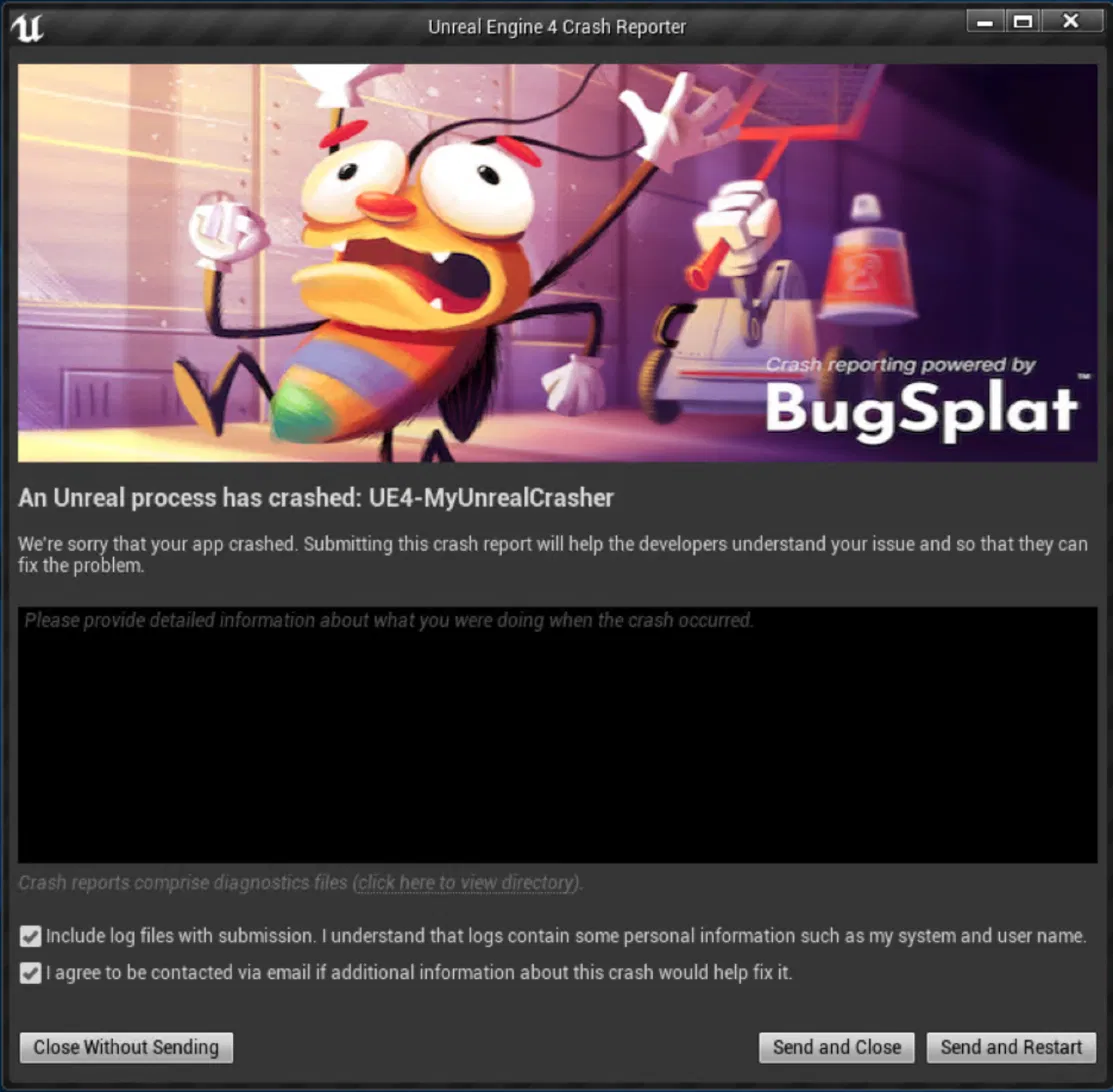
Your game crashes. At the worst possible moment, mid-match, on the verge of a win, the screen dies and Unreal's Crash Report Client pops up. By default, the dialog the player sees is the generic version, the one that ships with the engine before any studio makes it theirs.
That's a small thing that quietly costs you a lot.
The player who just lost their progress is being asked to submit a report through a prompt that doesn't look like the game they're playing. It's unfamiliar, it's easy to dismiss, and a meaningful number of players will just close it. Every one of those closes is a crash report you needed and didn't get, at exactly the moment your stack data is most valuable.
Here's the part a lot of teams don't take advantage of: that dialog is yours to change. Epic built the engine open source and the Crash Report Client on top of Slate specifically so studios can customize it. With some work, you can turn the default prompt into something that looks like it belongs to your game and routes crashes straight to you. The flexibility is already there. Most people just never reach for it.
What you can actually do with it
Once you're willing to rebuild the engine from source, the dialog is fully yours. The customizations that matter most for crash submission rates:
Brand it as your game. Drop in your own banner image and rewrite the copy so the player sees your studio. A dialog that looks like part of the game you're playing gets submitted far more often than a generic one.
Hide the stack trace from players. By default the dialog can show a raw, unsymbolicated stack trace. To a player, that's a wall of hex that makes a crash feel worse and a report feel riskier to send. You can strip it out of release builds entirely.
Keep the stack trace for your team. Here's the move most guides miss: use compiler conditionals to ship two versions of the dialog. Players get the clean, branded, no-stack-trace version. Your team, building in-editor where Unreal can symbolicate, keeps the full stack trace right there in the dialog. One dialog, two audiences, each getting what they need.
Send crashes where they belong. Crashes in your own game code don't route to you by default. Pointing the Crash Report Client at your own server is what turns "a crash happened somewhere" into a grouped, symbolicated report you can actually fix.
The shortcut most people don't realize they have
Worth saying clearly, because the old version of this advice scared people off: you do not have to recompile the engine just to route crashes to BugSplat. That part is a configuration change. Our Unreal plugin handles the DefaultEngine.ini setup for you, so crashes start flowing to your dashboard without touching a line of engine source.
The source-rebuild work above is the next level, for when you want to own the look and behavior of the dialog itself, not just where the reports go. Plenty of teams do both: plugin for the routing, a custom engine build for the branding.
This isn't theoretical, either. Starbreeze did exactly this kind of Crash Report Client customization in PAYDAY 3, wiring the dialog up to show players crash-specific support responses through BugSplat. When a known crash hits, the player can be told it's already fixed in the next patch, right there in the dialog, instead of going to hunt through Discord. That's the ceiling of what's possible when you take full ownership of this dialog.
Where to go from here
The full walkthrough, the Slate brush setup, the exact files to edit, the compiler-conditional pattern for dev-vs-release dialogs, and how to package a redistributable custom engine drop so your whole team can build against it lives in our docs, kept current against the engine so the steps don't rot between Unreal versions: BugSplat Unreal Engine docs
And if you'd rather start with the easy win, install the Unreal plugin, point your crashes at BugSplat with a config change, and have working crash reports before you decide whether the deeper dialog customization is worth your time.
Either way, the default dialog doesn't have to be the last thing your players see before they walk away from your crash report. You can make it yours, and it's not as hard as the engine's reputation suggests.
Questions about customizing the Crash Report Client for your game? We're real people who know Unreal. Reach us at support@bugsplat.com or on Discord. Happy splattin'.