

Here's the thing nobody tells you when you ship a Unity game: the crash that tanks your launch is never the one you saw in the editor. It's the one on a six-year-old laptop with an integrated GPU and a driver from 2019, running your IL2CPP build in a way your dev machines never did. You find out about it from a Steam review, three days after you could have fixed it.
Crash reporting is how you find out first. Not from reviews. From a dashboard, the morning after you ship, with the actual call stack in front of you.
Unity crashes in more than one register
A Unity game can fall over in a few different places, and the annoying part is that they don't all look the same.
There's the managed C# exception, the null reference, the index out of range, the thing that throws in Update and spams your log. There's the IL2CPP layer, where your C# got translated to C++ and compiled native, and the crash report reads like a native crash because it is one. And there's the genuinely native layer, the engine itself, a plugin, a graphics driver, where things die hard and leave a minidump. This is the layer Unity's own crash handler surfaces but doesn't really help you read, and it's the one a C#-only crash tool misses entirely.
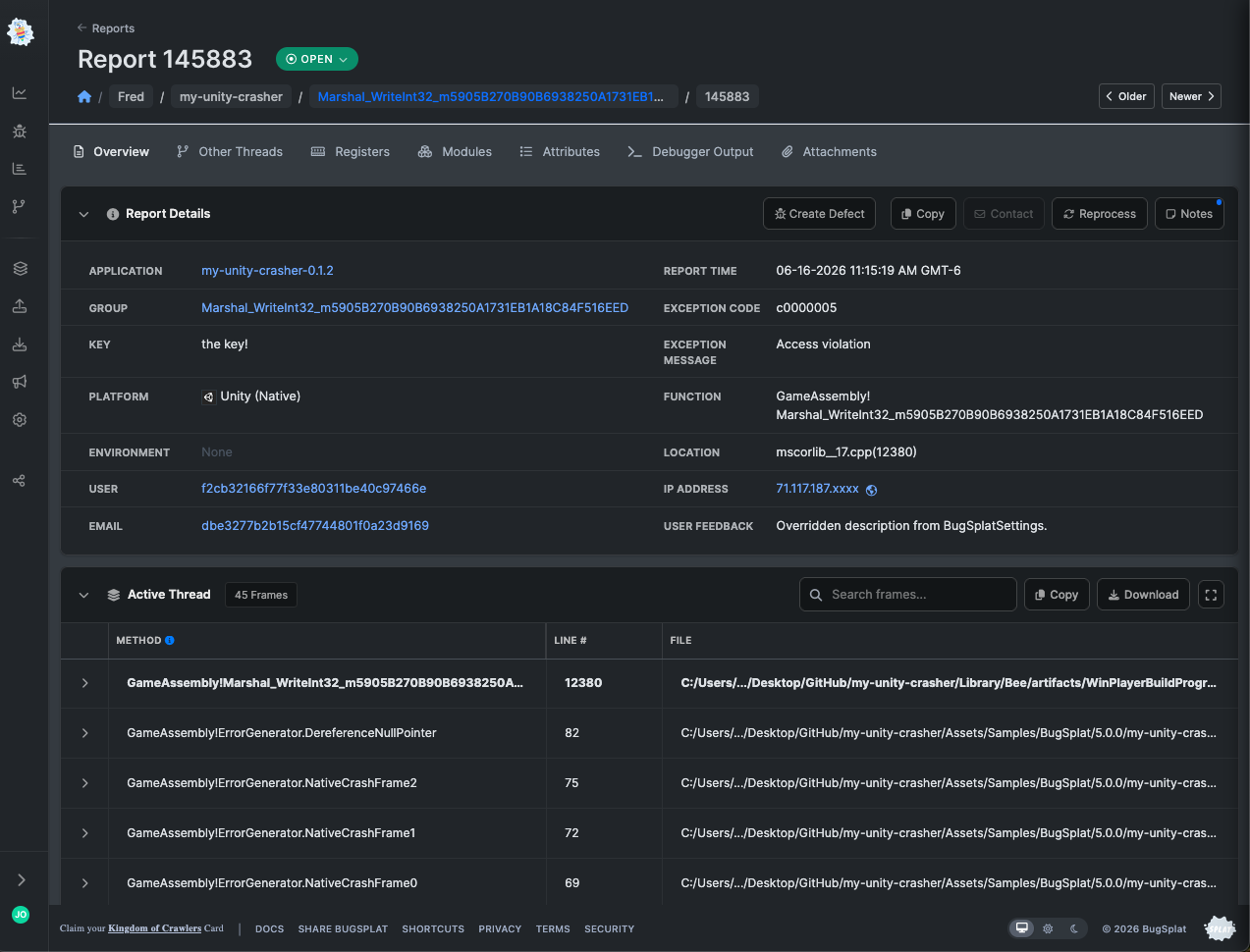
A crash tool that only reads your C# log misses the native deaths entirely, and those are usually the platform-specific, hard-to-reproduce ones that hurt most. BugSplat handles the native and IL2CPP side properly, symbolicating the crash into real function names and line numbers instead of an address dump, and groups everything in one place so you can see what's actually killing your game and how many players it's hitting.
What this looks like in practice
You add BugSplat to your build, ship it, and let real players do what no test plan can: play on hardware you've never seen, in combinations you'd never think to try. A crash comes back as a grouped, symbolicated report tagged with the build version and whatever you decided to attach, level name, GPU, scene, session length. You sort by frequency, fix the top three, ship a patch, and watch the count drop.
That last part is the part that feels good. There's a moment a lot of teams hit where they look at the dashboard and realize they're running out of crashes to fix. That's not a sales line, it's what happens when crash data is legible enough that fixing becomes routine instead of archaeological.
The custom attributes are where Unity devs get the most mileage. Crash grouped by the level it happened in. Crashes filtered to a specific GPU vendor. The "only on this one boss fight" bug that turns out to be a specific particle system on a specific driver. You attach the context, BugSplat makes it searchable, and the pattern jumps out of the noise.
Built for how games actually break
Most crash tools were built for web and mobile apps and bolted onto game engines afterward. You can feel it: they want HTTP error rates and request traces, and you've got a native minidump from a player's GPU driver. BugSplat went the other direction. We started with native crashes, console and PC and the messy reality of shipping a game, and the tooling reflects that. Symbolicated native stacks, minidump parsing, per-build symbols, the stuff a game actually needs.
You shouldn't have to hire an infrastructure engineer to know why your game crashes. A solo dev should be able to wire this up and read the reports. A small studio should be able to ship stable without a dedicated tools team. That's the whole point, and Unity is exactly the place it pays off, because the gap between "works on my machine" and "works on a stranger's machine" is enormous, and crash reporting is how you close it.
Full Unity setup is in the docs: docs.bugsplat.com
Want to see what's crashing your game? Start a free trial and send your first report. It takes a few minutes, and the first time you watch a real player crash turn into a fixable line of code, you'll get it.