
The BugSplat .NET SDK, Rebuilt: One NuGet Package for .NET Framework and .NET 10

CTO at BugSplat
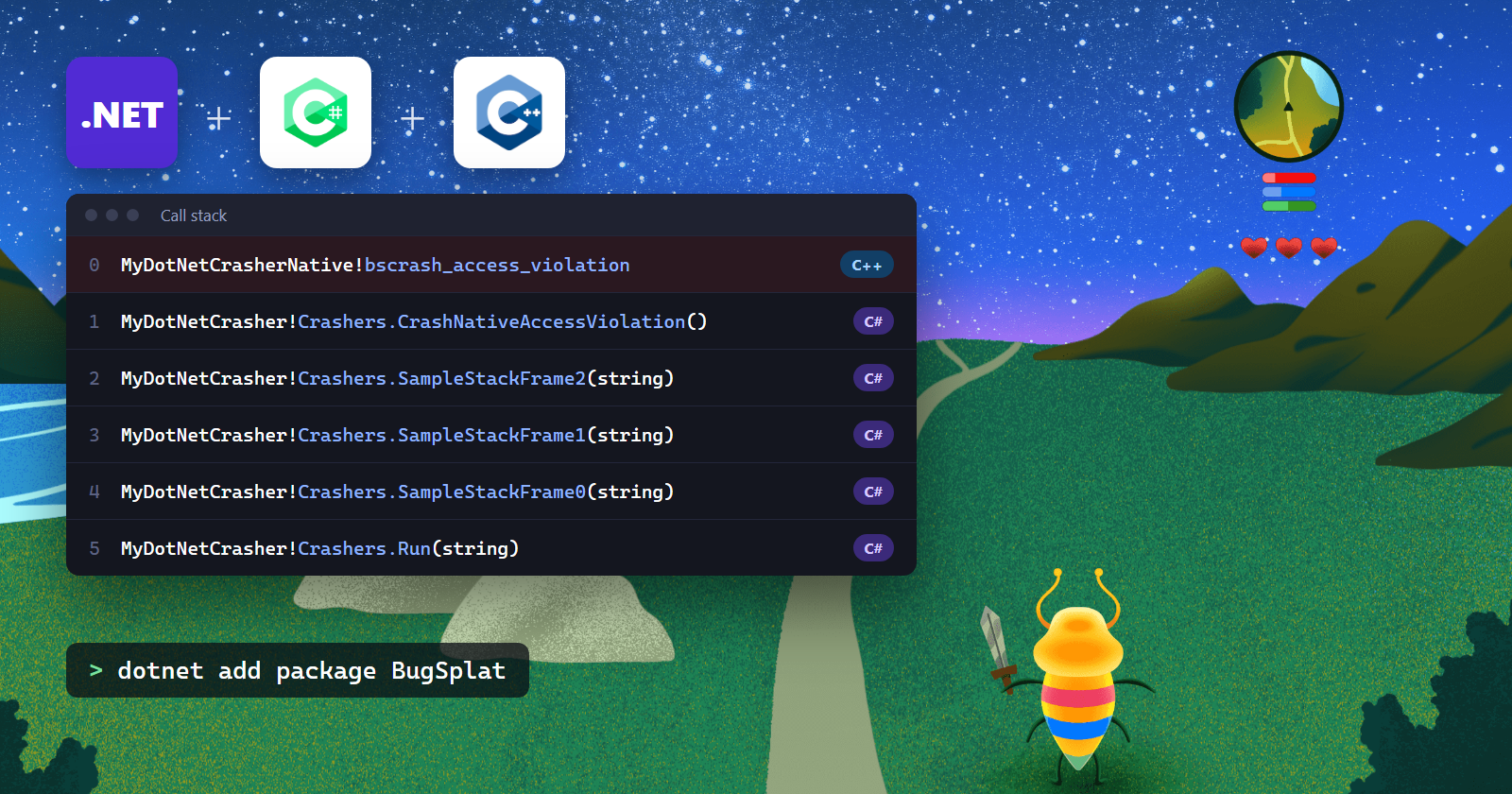
A lot of the software that game studios and enterprise teams ship on Windows is written in C#, and very little of that software is only C#. A WPF app calls a C++ library through P/Invoke, a native launcher hosts the .NET runtime, and a WinUI 3 front end sits on top of native components. When one of those apps crashes, the crash can start in C# code, start in C++ code, or pass through both, and the crash report needs to show the whole call stack either way. We recently rebuilt the BugSplat .NET SDK from the ground up to report crashes on both sides of the boundary between C# and C++.
The rebuilt BugSplat .NET SDK installs from one NuGet package that supports both .NET Framework and .NET 10. Every crash report is now a minidump, so a crash that crosses from C# into C++ arrives as one call stack with the C# frames and the C++ frames in order. Windows Error Reporting support captures the crashes that no exception handler inside a .NET app can catch, and on .NET 10 and WinUI 3 those crashes are far more common than they were on .NET Framework. We also rewrote the sample apps. This article covers each change and what we learned about how .NET apps crash along the way.
What's New
- One NuGet package,
BugSplat, for .NET Framework 4.7.2 and newer and for .NET 10, on x86, x64, and ARM64. - Every crash report is a minidump, including the handled exceptions you choose to report.
- C# and C++ frames in one call stack when a crash crosses P/Invoke in either direction.
- Windows Error Reporting support. Heap corruption,
__fastfailterminations, and .NET 10 fail-fasts can only be captured through Windows Error Reporting. - C# file names and line numbers for .NET 10 crash reports when you upload your symbols.
- A crash dialog you can style to match your app.
- Rewritten sample apps for console, WinUI 3, WPF, and native C++ host apps.
One NuGet Package for .NET Framework and .NET 10
Install the BugSplat .NET SDK from NuGet:
dotnet add package BugSplat
The BugSplat package contains one build for .NET Framework 4.7.2 and newer and one build for .NET 10. Both builds are compiled from the same source and have the same API, and NuGet picks the build that matches your target framework. The BugSplat package also contains BugSplat's native files for x86, x64, and ARM64. Each build copies the native files that match your app's architecture next to your executable, and dotnet publish does the same for single-file and multi-file apps. BugSplat signs the BugSplat package and the binaries inside the package.
Create one BugSplat object at the top of Main, or in your App constructor, and keep the object for the lifetime of the process:
using BugSplatDotNet;

var bugsplat = new BugSplat("your-database", "YourApp", "1.0.0")
{
    User = "fred",
    Email = "fred@example.com",
};
bugsplat.SetAttribute("channel", "beta");
Creating the BugSplat object installs BugSplat's exception handler and hang detection in your process. After that, BugSplat reports unhandled exceptions on any thread, including the WPF dispatcher thread, and crashes in the native code that your app calls. The User, Email, and attribute values are attached to every crash report. A separate process, BugSplatMonitor.exe, uploads each crash report, so the upload does not depend on the crashing app.
Every Crash Report Is a Minidump
Earlier versions of the BugSplat .NET SDK could post a managed exception as text. A text report only had line numbers if you shipped your .pdb files with your app, and a text report contained nothing about native code.
In the rebuilt BugSplat .NET SDK, an unhandled exception, a native crash, and a handled exception that you choose to report all produce a minidump. BugSplat symbolicates the minidump on our servers with the symbols you upload, so your crash reports have function names, file names, and line numbers without .pdb files in your installer.
To report an exception that your app handled, call Post inside the catch block, while the frames that threw the exception are still on the stack:
try
{
    LoadDocument(path);
}
catch (Exception ex)
{
    bugsplat.Post(ex);   // writes a minidump of this exception; your app keeps running
}
C# and C++ Frames in One Call Stack
Suppose your C# code calls a C++ library through P/Invoke:
[DllImport("PhysicsEngine.dll")]
static extern void StepSimulation(float seconds);
When the C++ code inside StepSimulation crashes, the crash report has one call stack with the C++ frames and the C# frames in the order they were called, like this illustration:
PhysicsEngine!ResolveContacts       contacts.cpp(212)
PhysicsEngine!StepSimulation        simulation.cpp(88)
YourGame!World.Update(float)        World.cs(41)
YourGame!Program.Main(string[])     Program.cs(17)
BugSplat symbolicates the C# frames from your managed PDB files and the C++ frames from your native PDB files. We tested each of these cases:
- An access violation several C++ frames below the P/Invoke call.
- C++ code that calls back into C# code that throws an exception (C# → C++ → C#).
- An uncaught C++ exception thrown below a P/Invoke call.
- A stack overflow that recurses back and forth across P/Invoke.
- A crash on a native thread that has no C# frames.
A native C++ executable that hosts the .NET runtime is supported too. Integrate the BugSplat Windows SDK for C++ in the C++ host and call SetCrashType(8) before the .NET runtime starts:
#include "BugSplat.h"

BugSplat g_BugSplat(L"your-database", L"YourApp", L"1.0.0");

int wmain()
{
    g_BugSplat.SetCrashType(8);   // crash type 8: .NET minidumps

    // Start the .NET runtime and call your C# code.
}
Crash type 8 is BugSplat's crash type for .NET minidumps, and setting crash type 8 tells BugSplat to resolve the C# frames in the minidump along with the C++ frames. The Crash Type Reference lists every BugSplat crash type. Crash reports from the C++ host then show the C# frames above the C++ frames of the host.
Crashes That Only Windows Error Reporting Can Capture
Some Windows crashes can only be captured through Windows Error Reporting. When an app hits heap corruption, a __fastfail call, or a /GS stack buffer check failure, Windows ends the app immediately and skips every exception handler inside the app. On .NET 10 the .NET runtime ends the app the same way for more kinds of crash than .NET Framework did, and a WinUI 3 app ends that way for every unhandled exception. The section What We Learned About How .NET Apps Crash has the details.
BugSplat captures those crashes with BugSplatWer.dll, which Windows Error Reporting loads into its own crash reporting process. Since version 8.5.0, BugSplatWer.dll writes the minidump, the crash signature, and your attachments, and then hands the crash report to BugSplatMonitor.exe to upload.
Windows Error Reporting only loads BugSplatWer.dll after your installer registers the full path to BugSplatWer.dll in the registry. The installer needs administrator rights to add the registry value:
reg add "HKLM\SOFTWARE\Microsoft\Windows\Windows Error Reporting\RuntimeExceptionHelperModules" /v "C:\Path\To\YourApp\BugSplatWer.dll" /t REG_DWORD /d 0 /f
A complete integration of the BugSplat .NET SDK therefore has two parts: the BugSplat object in your code and the registry value in your installer. The IsWerEnabled property tells you at run time whether BugSplatWer.dll is registered, so your app can log a warning at startup when the registry value is missing:
if (!bugsplat.IsWerEnabled)
{
    // Crashes that go through Windows Error Reporting won't be reported
    // until BugSplatWer.dll is registered.
    System.Diagnostics.Trace.TraceWarning("BugSplatWer.dll is not registered with Windows Error Reporting.");
}
The New Crash Dialog
Version 9.0 of the BugSplat Windows SDK includes a new crash dialog that you can style to match your app. Add a BugSplatTheme folder next to your project file, and write only the values you want to change:
YourApp.csproj
BugSplatTheme\
  theme.json
  strings.en-US.json
  logo.png
The BugSplat NuGet package copies the BugSplatTheme folder into your build output and checks the theme files for mistakes during each build. The crash dialog below uses a theme for a fictional game named Nebula Forge.
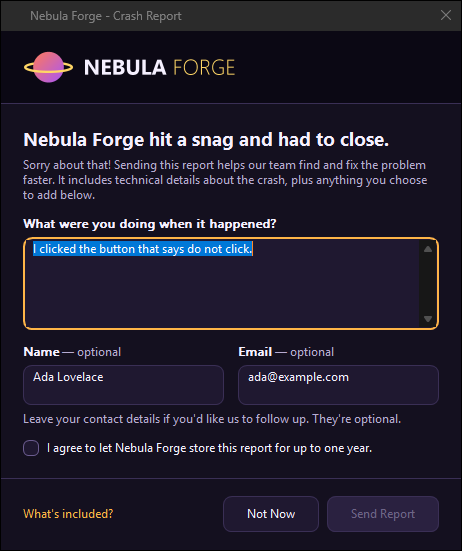
The Crash Dialog Branding guide lists every theme setting.
Sample Apps for Console, WinUI 3, WPF, and C++ Host Apps
We rewrote the .NET sample apps so that each common kind of .NET app has a sample. Every sample uploads its symbols after each build, so a crash you trigger arrives in BugSplat with file names and line numbers.
- MyDotNetCrasher is a .NET 10 console app with about twenty crash modes. The crash modes include managed exceptions, native access violations, C++ exceptions, callbacks across P/Invoke, and the crashes that only Windows Error Reporting can capture. Each crash mode crashes a few frames deep in a method named after the crash mode, so you can compare the call stack in BugSplat with the source code.
- MyDotNetWinUI3Crasher is a .NET 10 WinUI 3 app that is unpackaged and self-contained. MyDotNetWinUI3Crasher has cards for a crash, a handled exception, user feedback, a hang, and a crash that crosses from C# into C++. The sample also includes notes on shipping BugSplat's native files inside an MSIX package.
- MyDotNetFrameworkWpfCrasher is a .NET Framework 4.7.2 WPF app with the same cards as MyDotNetWinUI3Crasher, plus a heap corruption card that demonstrates a crash that requires Windows Error Reporting.
- MyDotNetFrameworkHostCrasher is a native C++ executable that starts the .NET Framework runtime and calls C# code. MyDotNetFrameworkHostCrasher crashes in C# code, on other threads, and in callbacks that go from C++ to C# and back to C++.
The source for MyDotNetCrasher, MyDotNetWinUI3Crasher, and MyDotNetFrameworkWpfCrasher is in the my-dotnet-crasher repository on GitHub.
What We Learned About How .NET Apps Crash
The .NET runtime decides how a process ends after a crash, and .NET 10 makes different decisions than .NET Framework. These runtime behaviors shaped the BugSplat .NET SDK:
- .NET 10 can end an access violation with a fail-fast. On .NET Framework, an access violation arrives as an
AccessViolationExceptionthat ordinary exception handlers can see. On .NET 10, the .NET runtime can printFatal error.and callRaiseFailFastException, which skips every exception handler in the process. The same thing happens to an access violation in native code below a P/Invoke call. Those crashes reach BugSplat only through Windows Error Reporting, so a .NET 10 app needsBugSplatWer.dllregistered. - WinUI 3 turns every unhandled exception into a fail-fast. A crash in a WinUI 3 app arrives as a
0xC000027Bstowed exception, and only through Windows Error Reporting. A WinUI 3 app that has not registeredBugSplatWer.dllreports no crashes at all. - The .NET runtime registers with Windows Error Reporting before your code runs. Windows Error Reporting offers each crash to its registered helper modules in the order the helper modules registered. The .NET runtime registers its own helper module at startup and claimed stack overflows for itself. BugSplat received no stack overflows on .NET Framework and only some stack overflows on .NET 10. Since version 9.0.0, BugSplat moves the .NET runtime's helper module behind
BugSplatWer.dllat startup. When BugSplat cannot capture a crash, Windows still creates its own crash report. - Start your app with its
.exefile. BugSplat looks forBugSplatMonitor.exenext to the executable of the running process. When you start your app withdotnet YourApp.dll, the executable of the running process isdotnet.exe, and BugSplat does not findBugSplatMonitor.exe. - A hang report waits for the user's answer. BugSplat detects a hang in about ten seconds and then shows a prompt, and the hang report is sent after the user answers the prompt. Set
QuietModewhen your app runs where no user can answer. - 32-bit .NET Framework reports the
catchlocation. In a 32-bit .NET Framework app,Postinside acatchblock reports where the exception was caught. The BugSplat .NET SDK guide shows how to report where the exception was thrown.
What's Next
- Unity. Version 5.0 of the BugSplat Unity SDK uses the same Windows crash reporting that this article describes, and we will announce version 5.0 of the BugSplat Unity SDK on this blog soon.
- Godot. We are investigating support for Godot, including Godot games with C# scripts.
- A theme editor for the crash dialog. We are building a theme editor for the crash dialog in the BugSplat dashboard.
Get Started
Add the BugSplat NuGet package to your project, register BugSplatWer.dll in your installer, and upload your symbols. Upload the symbols for a .NET 10 app with symbol-upload version 11.0.1 or newer, which is the first version that stores portable PDB files where BugSplat can find them. The BugSplat .NET SDK guide covers each step. If the BugSplat .NET SDK misses a crash or reports a crash badly, email support@bugsplat.com and tell us what happened.